Palworld – Pal-Info – Simple-HUD-Mod v0.8.3
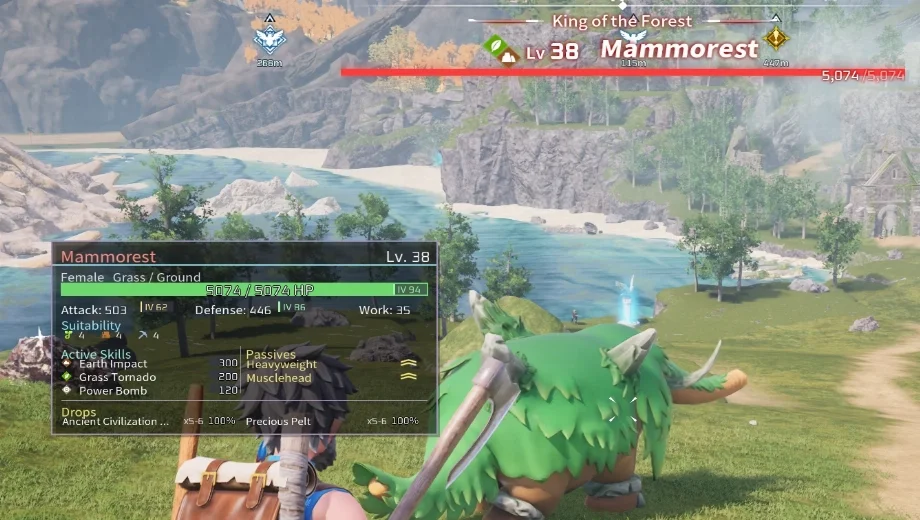
                    Palworld never tells you what you’re actually aiming at, so guessing a Pal’s stats or a target’s drops means opening menus mid-fight. Pal Info Simple HUD solves that by drawing a live information card the moment you aim at a Pal or NPC. It runs entirely client-side through UE4SS, reading existing game data without touching stats, loot tables, or save files. As a result, you get instant, detailed context on any target without ever leaving the action.
Was ist inbegriffen?
Pal Information Display
- Automatic Target Detection: Shows a custom card the instant you aim at a Pal or human NPC, and hides it the moment you look away.
- Core Stats and IVs: Displays name, level, gender, element types, HP, Attack, Defense, and Work Speed, alongside color-coded IV values so you can judge quality at a glance.
- Work Suitability Icons: Lists suitability icons and levels directly on the card, so you know a Pal’s base role without opening its menu.
Skills and Drop Details
- Active and Passive Skill Breakdown: Shows equipped active skills with element icons and power values, plus passive skills marked as positive, negative, mixed, or neutral.
- Drop Information: Lists up to six possible drops in two columns, each with a localized name, quantity range, and drop percentage.
Customization and Settings
- Built-In Settings Menu: Opens with F6 and lets you adjust card position, scale, and background color and opacity, with changes saved automatically.
- Optional DekModConfigMenu Integration: Syncs settings with DekModConfigMenu when it’s installed, though the mod works fully without it.
Warum Sie diesen Mod brauchen
Checking a Pal’s stats or a target’s drops usually means pausing to dig through menus. However, that breaks the flow of combat, capturing, or scouting a base. This mod puts that information directly in view instead. Therefore, you can judge a fight or a capture attempt in real time, without ever pausing the action.
Wie man anfängt
- Lade den Mod herunter und entpacke das Archiv auf deinem PC.
- Installieren Sie UE4SS for Palworld first if you haven’t already.
- Extract the PalInfoCustomHUD folder into Pal/Binaries/Win64/ue4ss/Mods, keeping the scripts and userconfig files intact.
- Launch the game and aim at any Pal or NPC to confirm the card appears.
- Press F6 in-game to open the settings menu and adjust position, scale, or background color to your liking.
- To uninstall, remove the PalInfoCustomHUD folder from your UE4SS Mods directory. Existing save files are unaffected either way.
Gut zu wissen
This is a client-side mod, so only players who want to see the HUD need to install it, and the server itself never requires it. Additionally, it only reads existing game data. It does not change Pal attributes, capture mechanics, loot tables, or combat calculations, so it’s safe to add or remove mid-campaign. The mod was developed and tested against UE4SS v3.0.1 Beta specifically, so keeping your UE4SS build current helps avoid compatibility issues.
- File name: Palworld_PalInfoCustomHUD_v0.8.3

- Secure Software (Virus checked, GDPR-compliant)
- Easy to use: get ready in less than 5 min
- More than 5300+ supported Games
- +1000 Patches every month & Support


![Moadra v1.0 (+6 Trainer) [RazorDOX]](https://618b31e8.delivery.rocketcdn.me/wp-content/uploads/2026/10/Moadra-01-464x276.jpg)

![Dying Light 2 Stay Human v1.0-v1.3x+ (+33 Trainer) [FLiNG]](https://618b31e8.delivery.rocketcdn.me/wp-content/uploads/2024/03/dying-light-2_0-464x276.jpg)