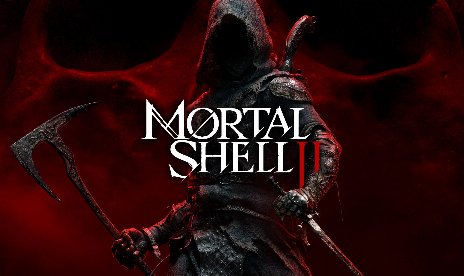
Mortal Shell II: Rogue Knight – PROXIMA-Mod v1.11

                    PROXIMA’s default appearance in Mortal Shell II doesn’t suit every player’s preference for how the shell should look. Rogue Knight PROXIMA adds a hooded redesign with adjusted body proportions and physics-based cloth movement, switching her presentation to a Rogue Knight style. It ships as three separate files, including two Dark Elf Ranger options and a standard version without the Dark Elf ears. As a result, you can pick the exact variant that matches your preferred look.
Was ist inbegriffen?
- RogueKnightLady (NoEars): The base redesign. Adds the hooded look, adjusted proportions, and physics-based cloth movement, without any Dark Elf ear features.
- Dark Elf Ranger: Adds Dark Elf Ranger ears with enhanced jiggle physics and improved textures, including asymmetrical blood effects on each ear.
- Dark Elf Ranger Light: The same Dark Elf Ranger variant, but paired with a light-colored hood matching the BONEGRAFTED skin.
- Reused Hood Asset: Repurposes the hood from another shell across all three files, so that other shell’s appearance also shifts slightly from the shared texture edits.
Warum Sie diesen Mod brauchen
A single default appearance doesn’t fit every player’s preferred aesthetic for their shell. Additionally, some players want the Dark Elf Ranger look while others prefer a simpler redesign without it. This mod covers both with three distinct files. Therefore, you can choose the exact variant that fits your taste instead of settling for one fixed option.
Wie man anfängt
- Laden Sie die gewünschte Variante herunter und entpacken Sie das Archiv auf Ihrem PC.
- Wählen Sie RogueKnightLady (NoEars) for the base hooded redesign without Dark Elf ears.
- Wählen Sie Dark Elf Ranger instead if you want the Dark Elf ears with enhanced jiggle physics and asymmetrical blood detailing.
- Wählen Sie Dark Elf Ranger Light instead if you want the same Dark Elf Ranger ears paired with a light-colored hood matching the BONEGRAFTED skin.
- Extract the files to Game Root directory/MortalShell2/Content/Paks/~mods.
- Erstellen Sie zunächst den Ordner „~mods“, falls dieser noch nicht vorhanden ist.
- Install only one of the three files at a time, since all three replace the same PROXIMA assets.
- Launch the game and switch to PROXIMA to see the new appearance.
- To uninstall, remove the installed file from your ~mods folder.
- File name: MSII_RogueKnightLady_NoEars_v1.1
- File name: MSII_DarkElfRanger_v1.1
- File name: MSII_DarkElfRangerLight_v1.11

- Secure Software (Virus checked, GDPR-compliant)
- Easy to use: get ready in less than 5 min
- More than 5300+ supported Games
- +1000 Patches every month & Support



![Dying Light 2 Stay Human v1.0-v1.3x+ (+33 Trainer) [FLiNG]](https://618b31e8.delivery.rocketcdn.me/wp-content/uploads/2024/03/dying-light-2_0-464x276.jpg)

![Corsair Cove v1.2.4 (+14 Trainer) [gutzufuss1477]](https://618b31e8.delivery.rocketcdn.me/wp-content/uploads/2026/08/Corsair-Cove-01-464x276.jpg)