Mod «Pretty Plants» de Fields of Mistria Effe, v1.0
agosto 25, 2026 - 5:57pm
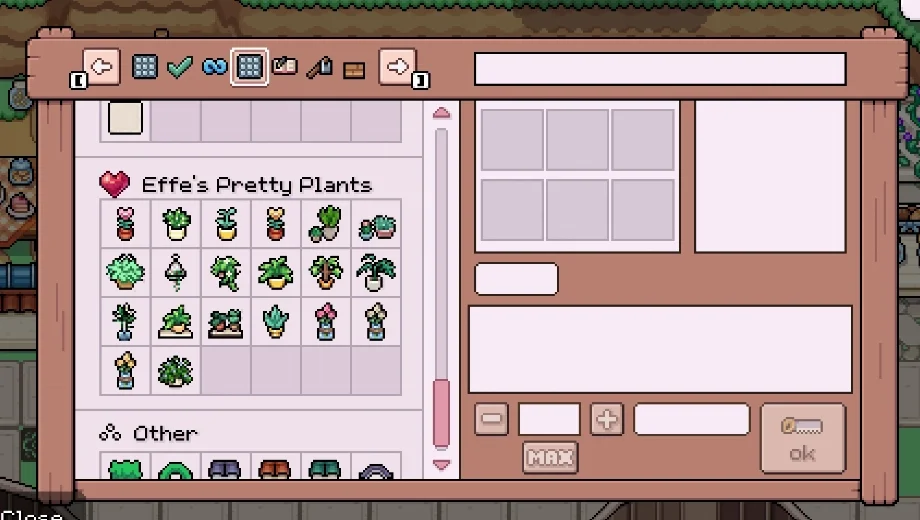
                    Fields of Mistria’s decorating options for plants can feel limited once you’ve placed everything the base game offers. Effe’s Pretty Plants adds 17 new wall, floor, and tabletop plants, mixing original artwork with reworked vanilla sprites. It also gives the original monstera plant a visual upgrade. As a result, you get a much wider variety of greenery to decorate your home with.
Qué incluye
- 17 New Plants: Adds a mix of wall, floor, and tabletop plants combining original art with edited vanilla sprites.
- Upgraded Monstera Plant: Reworks the original monstera plant’s appearance for a cleaner look.
- Crafting Scroll Access: Makes the new plants available through a crafting scroll sold by Balor’s Wagon.
Por qué necesitas este mod
Vanilla plant options run out fast once you’ve decorated a few rooms. Additionally, some vanilla sprites could use a visual refresh. This mod adds both new variety and small upgrades. Therefore, decorating your home gets a much wider range of options to work with.
Cómo empezar
- Download the latest release of Mods of Mistria Installer.
- Copy the Mods of Mistria.exe file into your Fields of Mistria Steam folder. You can find this by right-clicking Fields of Mistria in Steam, selecting Manage, then Browse Local Files.
- Descarga el mod y descomprime el archivo en tu ordenador.
- Extract the mod’s zip file into the mods folder inside your Fields of Mistria Steam folder, creating a mods folder if you don’t already have one.
- Make sure only one folder sits between your mods folder and the mod’s manifest.json file, since an extra nested folder will stop the installer from finding it.
- Run Mods of Mistria.exe. It should detect the mod, letting you click Install.
- Buy the crafting scroll from Balor’s Wagon, then find the new plants in the vanilla Sets tab rather than the Everything tab.
- After any game update, run the installer and hit Uninstall, verify your game files through Steam, then run the installer again and hit Install to restore your mods.
- To uninstall, run the installer and hit Uninstall, verify your game files through Steam, remove this mod’s folder, then reinstall your remaining mods.
Download
File information
agosto 25, 2026 - 5:57pm
- File name: FieldsofMistria_EffeSPrettyPlants_v1.0
Game is supported by PLITCH

PLITCH - Free & Premium Game Trainer
- Secure Software (Virus checked, GDPR-compliant)
- Easy to use: get ready in less than 5 min
- More than 5300+ supported Games
- +1000 Patches every month & Support

The Hardcore Gaming Experience
Pioneering in offering game trainers and other hardcore gamer-centric content.
LATEST UPDATES


![Wild West Supermarket Simulator v1.0.682a (+4 Trainer) [RazorDOX]](https://618b31e8.delivery.rocketcdn.me/wp-content/uploads/2026/10/Wild-West-Supermarket-Simulator-01-464x276.jpg)

![Eastern Era v1.0-v1.1.x+ (+63 Trainer) [FLiNG]](https://618b31e8.delivery.rocketcdn.me/wp-content/uploads/2026/06/Eastern-Era-01-464x276.jpg)




The Hardcore Gaming Experience
Pioneering in offering game trainers and other hardcore gamer-centric content.