Palworld Ultra Weather – Mod « With Volumetric Clouds » v1.0.1
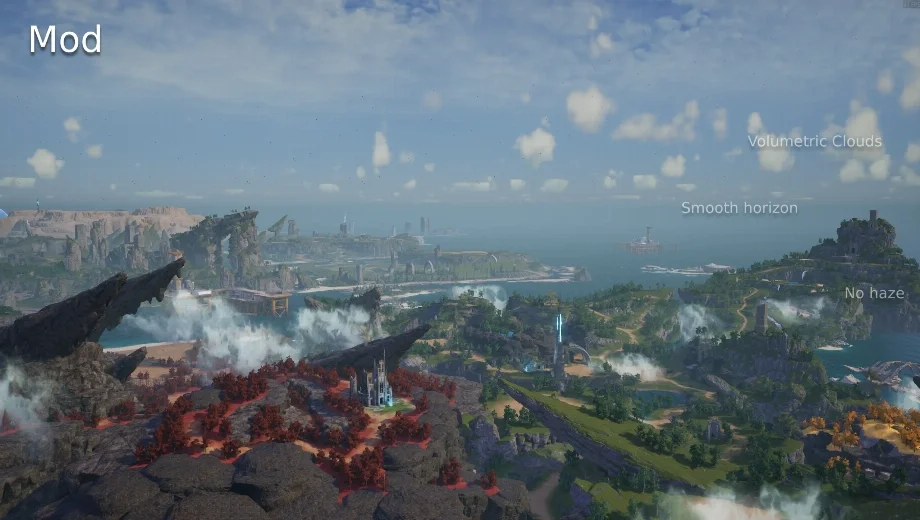
                    Palworld ships with its volumetric cloud system disabled, leaving skies flat and a green cast at sunrise and sunset. Ultra Weather enables real ray-marched clouds, rebuilds every time-of-day preset on a corrected atmosphere, and blends fog color across the day. It runs entirely through a single config.lua file, so changes apply instantly with a key press. As a result, Palworld’s sky finally matches the detail of the rest of the world.
Ce qui est inclus
- Volumetric Clouds: Enables real ray-marched clouds with sun-driven shadows, raising sampling quality above the game’s disabled defaults.
- Rebuilt Time-of-Day Presets: Reworks five daily slots with their own cloud coverage, fog, haze, and light temperature, crossfading smoothly between them.
- Fog Tint Interpolation: Blends fog color across the day instead of leaving it static, since Palworld’s fog normally ignores preset color fields.
- Three Adjustable Modes: Offers CloudsOnly for a light touch, VanillaPlus for tweaked stock presets, or UltraWeather for the full custom sky.
Pourquoi vous avez besoin de ce module
A disabled cloud system leaves Palworld’s sky looking noticeably flat. Additionally, the stock atmosphere carries a green tint at sunrise and sunset that breaks immersion. This mod corrects both issues directly. Therefore, the sky finally matches the level of detail found in the rest of the game’s visuals.
Comment démarrer
- Téléchargez le mod et décompressez l'archive sur votre PC.
- Installer UE4SS for Palworld first, and launch the game once to confirm it works.
- Extract the archive into your game folder so it forms ue4ss/Mods/UltraWeather, keeping config.lua, enabled.txt, and the Scripts folder intact.
- If you run Ultra Graphics older than version 1.2.0, open its config.lua and set WeatherPresets Enabled to false first.
- Adjust settings in config.lua if you want, then start the game.
- Presse F8 in-game any time you edit config.lua to apply changes instantly.
- To uninstall, delete the UltraWeather folder. Nothing is written to your save or game files.
Bon à savoir
This mod pairs with Ultra Graphics by design, since Ultra Graphics handles lighting and Lumen while Ultra Weather handles the sky. However, it works perfectly well on its own too. Volumetric clouds do carry a real performance cost, so lowering TracingMaxDistance in config.lua is the fastest way to recover frames if needed.
- File name: Palworld_UltraWeather_v1.0.1

- Secure Software (Virus checked, GDPR-compliant)
- Easy to use: get ready in less than 5 min
- More than 5300+ supported Games
- +1000 Patches every month & Support



![Wild West Supermarket Simulator v1.0.682a (+4 Trainer) [RazorDOX]](https://618b31e8.delivery.rocketcdn.me/wp-content/uploads/2026/10/Wild-West-Supermarket-Simulator-01-464x276.jpg)

![Eastern Era v1.0-v1.1.x+ (+63 Trainer) [FLiNG]](https://618b31e8.delivery.rocketcdn.me/wp-content/uploads/2026/06/Eastern-Era-01-464x276.jpg)