Mod « Lootlight » pour le remake de Gothic 1, version 1.1.1
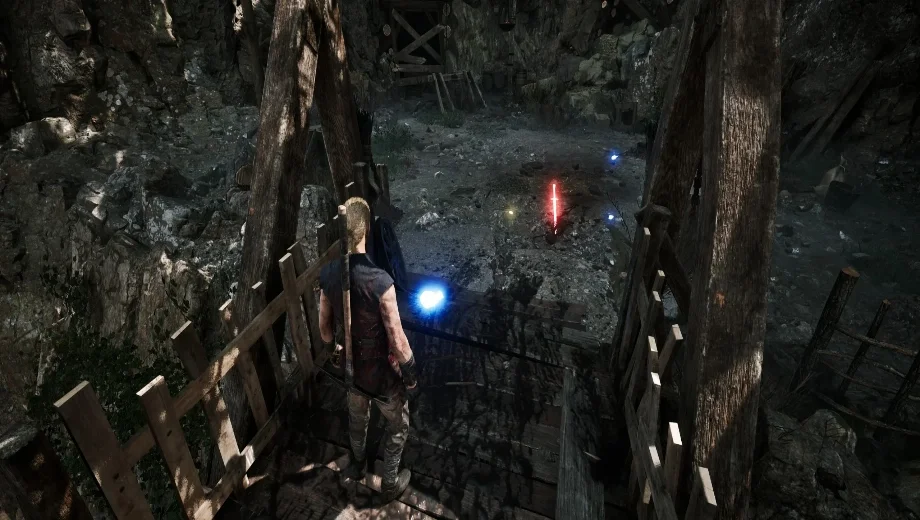
                    Gothic 1 Remake’s ground items can be difficult to spot in dark caves, cluttered camps, and post-battle areas, which makes looting feel more like a pixel hunt than a natural part of exploring. The Lootlight mod adds a color-coded emissive glow to every nearby pickable item, toggled on and off with a single key press. Furthermore, the glow updates automatically as you move through the world so items that stream in are highlighted without you pressing the key again. Consequently, spotting loot at a distance and in the dark becomes a glance rather than a search.
Ce qui est inclus
- One-key highlight toggle, defaulting to F4.
- Color-coded glow by category: weapons red, plants green, ore and coins yellow, everything else blue.
- Bright emissive glow visible at distance and in the dark.
- Auto-updating as items stream in and out of range.
- Configurable key, range, refresh rate, glow strength, and colors in
config.txt. - No game files or saves modified.
Pourquoi vous avez besoin de ce module
This mod is useful if you want faster and more reliable looting without missing items in dark or cluttered areas. The color coding also lets you decide at a glance whether something is worth walking over before you commit to the detour. Additionally, all values in the config file are tunable, so you can keep the effect subtle or make it as vivid as you prefer.
Comment démarrer
- Téléchargez l'archive du mod et décompressez-la sur votre PC.
- Installer UE4SS experimental build pour le remake de Gothic 1, si ce n'est pas déjà fait.
- Copier le Lootlight folder into the matching UE4SS Mods directory for your build:
Experimental build:
.../Gothic 1 Remake/G1R/Binaries/Win64/ue4ss/Mods/

Stable / AstAnDK build:
.../Gothic 1 Remake/G1R/Binaries/Win64/Mods/
- Confirm the final layout includes:
.../Mods/Lootlight/enabled.txt
.../Mods/Lootlight/config.txt
.../Mods/Lootlight/Scripts/main.lua
- Launch the game. The mod loads automatically. Press F4 to toggle the highlight.
- To configure, open
Lootlight\config.txt, change the values you want, save, and restart the game. - Pour désinstaller le programme, supprimez le fichier Lootlight dossier situé dans le répertoire « Mods ».
Bon à savoir
- Keep the detection radius modest. The default is 20 meters. Very large values highlight hundreds of items at once and cost FPS.
- On the experimental UE4SS build only, rare crashes can occur during heavy item streaming with the glow active. A fix is in progress. Workaround: keep the range small or toggle the glow off before opening your inventory.
- The stable AstAnDK build is unaffected by the crash issue.
- Le Linux, ajouter
WINEDLLOVERRIDES="dwmapi=n,b" %command%à vos options de lancement Steam.
- File name: G1R__Lootlight_v1.1.1

- Secure Software (Virus checked, GDPR-compliant)
- Easy to use: get ready in less than 5 min
- More than 5300+ supported Games
- +1000 Patches every month & Support




![CarX Street v1.15.0 (+5 Trainer) [xX_Morda_Xx]](https://618b31e8.delivery.rocketcdn.me/wp-content/uploads/2024/09/carx-street-1-464x276.jpg)

![CONTROL Resonant v1.0-v1.4.x+ (+26 Trainer) [FLiNG]](https://618b31e8.delivery.rocketcdn.me/wp-content/uploads/2026/09/CONTROL-Resonant-01-464x276.jpg)