My Winter Car Second Bachglotz Mod v1.0.3
February 20, 2026 - 8:50am
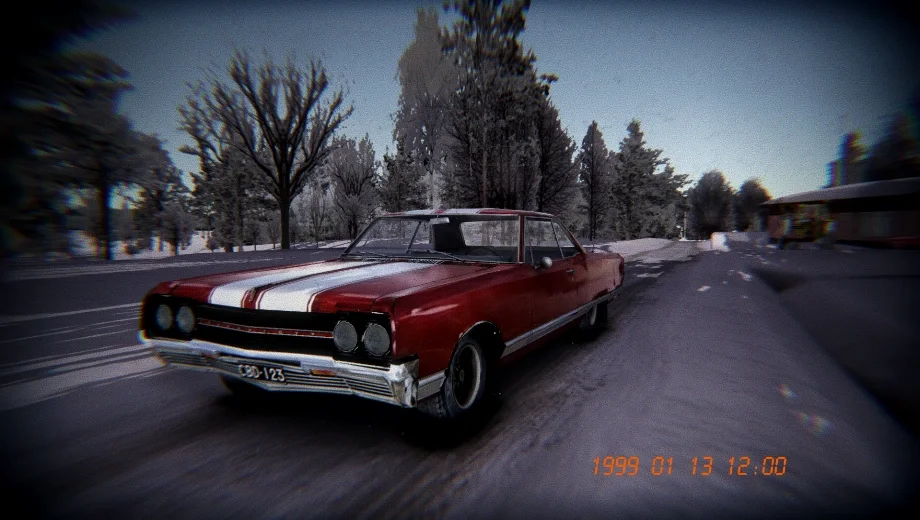
                    The Second Bachglotz mod adds a brand-new, standalone vehicle to My Winter Car: a second Bachglotz that spawns directly at your parents’ house. Far from just a copy, this car is a highly customizable daily driver or project car. You can completely overhaul its look with custom paints and liveries, swap its drivetrain to suit the snowy roads, and tweak its performance on the fly. It saves its fuel level and position between sessions, making it a reliable addition to your garage.
Key Features
- New Vehicle: Adds a second functional Bachglotz to the game world that persists between saves. It features a working heater to keep you warm during winter drives.
- Drivetrain Swaps: Toggle the car between Front-Wheel Drive (FWD), Rear-Wheel Drive (RWD), or All-Wheel Drive (AWD) via the mod settings to match your driving style.
- Deep Customization:
- Paint: Use an in-game RGB picker (Ctrl + P) to paint the car any color.
- Liveries: Supports custom textures for the body, interior, dashboard, and steering wheel.
- Accessories: Swap between default and “Magnum” rims, and toggle mudflaps, antennas, or a tachometer.
- Performance Tuning: Adjust front and rear wheel grip independently to dial in the handling.
- Quality of Life: Includes a “Reset” button in the settings to respawn the car if it gets lost or stuck, plus a customizable license plate system that validates Finnish formats.
Additional Details
- Requirement: You must have MSC Loader (or a compatible mod loader) installed for this mod to function.
- Custom Textures: To apply custom skins, place your `.png` files (e.g., `bachglotz_paint.png`) into the `Mods/Assets/Second Bachglotz` folder.
- License Plates: The custom plate system requires valid Finnish formats, such as 2-3 letters followed by a dash and 1-3 numbers (e.g., “ABC-123”).
How to Install
- Download and install MSC Loader if you haven’t already.
- Download the Second Bachglotz mod file.
- Open the downloaded archive. You should see a `.dll` file and an `Assets` folder.
- Navigate to your game’s `Mods` directory.
- Drag both the `Second Bachglotz.dll` file and the `Assets` folder directly into the `Mods` directory.
- Launch the game. The new car will spawn near the player’s house.
Download
File information
February 20, 2026 - 8:50am
- File name: MyWinterCar_SecondBachglotz_v1.0.3
Game is supported by PLITCH

PLITCH - Free & Premium Game Trainer
- Secure Software (Virus checked, GDPR-compliant)
- Easy to use: get ready in less than 5 min
- More than 5300+ supported Games
- +1000 Patches every month & Support

The Hardcore Gaming Experience
Pioneering in offering game trainers and other hardcore gamer-centric content.
LATEST UPDATES



![Wild West Supermarket Simulator v1.0.682a (+4 Trainer) [RazorDOX]](https://618b31e8.delivery.rocketcdn.me/wp-content/uploads/2026/10/Wild-West-Supermarket-Simulator-01-464x276.jpg)

![Eastern Era v1.0-v1.1.x+ (+63 Trainer) [FLiNG]](https://618b31e8.delivery.rocketcdn.me/wp-content/uploads/2026/06/Eastern-Era-01-464x276.jpg)




The Hardcore Gaming Experience
Pioneering in offering game trainers and other hardcore gamer-centric content.





