Hollow Knight: Silksong ShowDamage HealthBar Mod v1.0.5
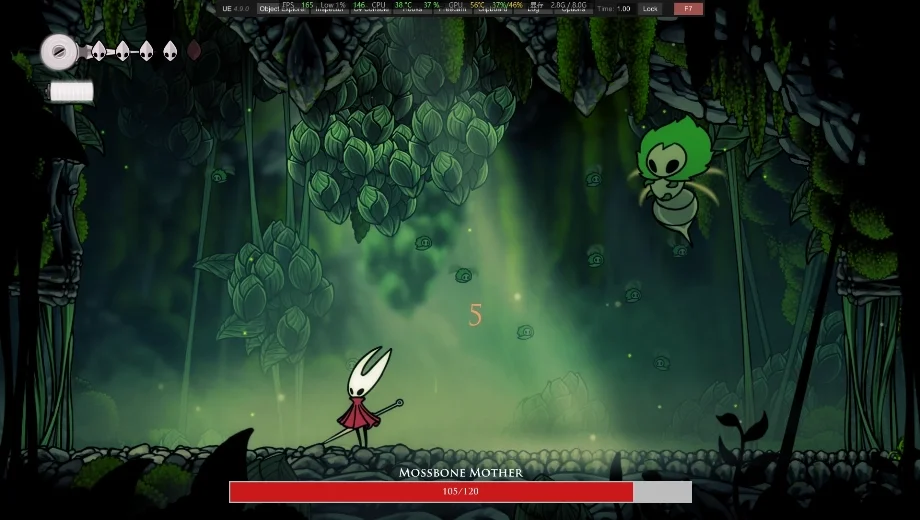
                    The ShowDamage HealthBar by xiaohai mod for Hollow Knight: Silksong adds clean enemy health bars and floating damage numbers, so every swing, needle art, and tick of damage tells a clear story.
It’s a perfect fit for practice-minded players, trainer users, and anyone who wants transparent feedback during boss labs, routing, or build testing without touching enemy behavior.
Hollow Knight: Silksong Mod Key Features
- Enemy health bars: appears on hit, tracks percent remaining, and keeps a fixed left-to-right fill so orientation never flips mid-fight.
- Damage text: brief, readable numbers for each instance of damage; great for verifying combos, DOTs, and silk spend value.
- HP numbers: optional “Current HP / Max HP” above the bar with adjustable font size and color for precise checks.
- Boss health bar: separate style with its own threshold, palette, and position toggle (top or bottom of the screen).
- In-game GUI: press HOME to open a bilingual (EN/中文) panel and tweak settings live without restarting.
- Fully configurable: tune colors (hex), scale, text placement, durations, and more through the GUI or a config file.
- Smart updates: recent versions fix overlapping boss bars and clean up remnants, keeping the overlay stable during hectic encounters.
In-Game Impact and Use Cases
This Hollow Knight: Silksong Mod elevates combat visibility without nerfing the game. It’s pure information: better reads on stagger thresholds, phases, and whether a risky silk spend is actually worth it.
Use it to lab boss windows, verify optimal routes, or sanity-check damage breakpoints on specific moves. It also helps during exploration runs when testing new areas and enemy variants.
- Boss practice: set the boss threshold so the special bar only appears on high-HP targets; dial colors for quick “phase glance” reads.
- Build validation: toggle damage text to confirm real DPS gains from charms, silks, or route changes.
- Clutter control: hide HP numbers inside the bar or above it; scale the whole UI up/down to match a preferred HUD density.
- Training-friendly: pairs naturally with personal trainer rulesets by giving immediate feedback while keeping the core combat intact.
Installation & Prerequisites
- Requirements: BepInEx 5 (do not use 6.x for this plugin).
- Config file path (auto-generated after first run): BepInEx/config/Xiaohai.Silksong_HealthBar.cfg
- Install BepInEx 5 into the Hollow Knight: Silksong folder.
- Launch the game once, then close it to generate the BepInEx structure (confirm the BepInEx\plugins folder exists).
- Download the mod file from the Downloads section and place it into BepInEx\plugins.
- Start the game. Press HOME to open the in-game configuration panel and tailor the overlay to taste.
- Optional: edit Xiaohai.Silksong_HealthBar.cfg for precise hex colors, font sizes, positions, and thresholds.
Troubleshooting & Tips
- Nothing shows? Verify BepInEx 5 is active, the DLL sits in BepInEx\plugins, and the GUI opens with HOME.
- Too busy mid-fight? Lower HealthBarScale, shorten damage text duration, or move numbers inside the bar to reduce eye clutter.
- Color not right on a specific background? Swap to higher-contrast hex values for both the bar fill and text colors.
- File name: HollowKnightSilksong_ShowDamageHealthBar_v1.0.5

- Secure Software (Virus checked, GDPR-compliant)
- Easy to use: get ready in less than 5 min
- More than 5300+ supported Games
- +1000 Patches every month & Support


![Garfield – Escape from Monday v1.0 (+7 Trainer) [RazorDOX]](https://618b31e8.delivery.rocketcdn.me/wp-content/uploads/2026/10/Garfield-Escape-from-Monday-01-464x276.jpg)

![Grounded 2 (+38 Trainer) [FLiNG] – Update September 2026](https://618b31e8.delivery.rocketcdn.me/wp-content/uploads/2025/08/Grounded-2-1-464x276.jpg)