Street Fighter 6 Text Effects Mod v1.0
January 21, 2026 - 11:20pm
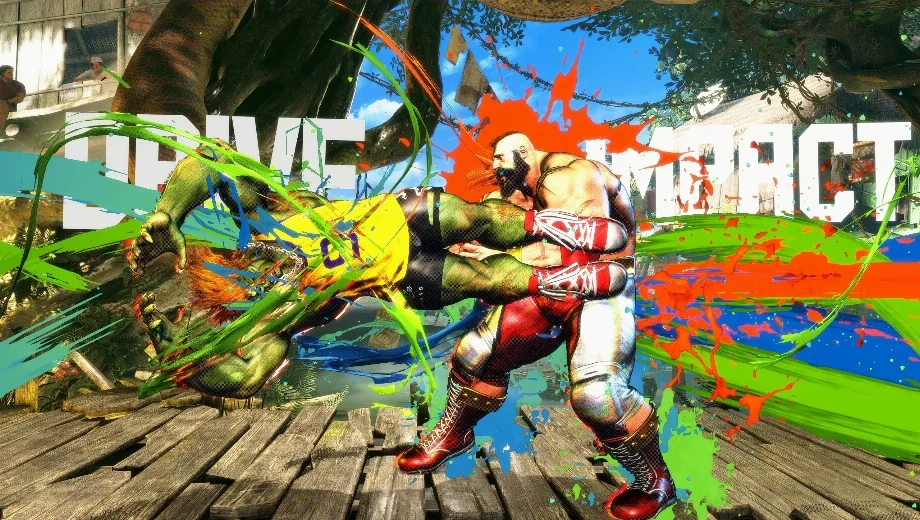
                    The Text Effects mod injects a bold, arcade-style visual flair into Street Fighter 6 by adding dynamic text overlays to key combat events. Instead of relying solely on standard particle effects or sound cues, this mod displays distinct text indicators whenever you execute actions like Counter Hits, Perfect Parries, or Drive Impacts. Consequently, gameplay becomes instantly more readable and stylish, helping you recognize critical game states in the heat of battle while adding a unique, comic-book aesthetic to your matches.
Key Features
- Visual Indicators: Adds text effects for crucial moments such as Counter Hits, Punish Counters, and Perfect Parries.
- Drive System Clarity: Clearly marks Drive Rush, Drive Impact (start, armored hit, and punish), and Burnout states with specific text.
- Modular Customization: You can choose exactly which effects you want to keep. If you dislike a specific text overlay, simply delete its corresponding file from the mod archive before installing.
- Enhanced Feedback: Provides immediate visual confirmation for complex interactions, making it easier to confirm hits and punishes.
Additional Details
- Mirrored Text: Due to how the game renders effects on different sides of the screen, some text may appear mirrored depending on your character’s facing direction. This is a known technical limitation.
- Safe to Use: This is a visual-only mod that replaces effect files. However, as with all cosmetic mods, use it at your own discretion online.
- File Customization List: If you want to disable specific effects, delete the corresponding file from the mod folder:
efd_10_hit_002_00.efx: Counter Hitefd_10_hit_003_00.efx: Punish Counterefd_10_guard_002_00.efx: Just Guard (Perfect Parry)efd_10_drive_000_00.efx: Drive Impact (Start)efd_10_drive_001_00.efx: Drive Impact (Armored Hit)efd_10_drive_002_00.efx: Drive Impact (Punish)efd_10_rush_000_00.efx: Drive Rush (Start)efd_10_sys_050_00.efx: Burnout (Start)
How to Install
- First, ensure you have a compatible mod manager installed (Fluffy Mod Manager is highly recommended for Street Fighter 6).
- Next, download the Text Effects mod file.
- (Optional) Open the downloaded archive and delete any
.efxfiles from the list above if you do not want that specific effect. - Then, drag and drop the archive into your mod manager window or move it to the manager’s mods folder.
- Finally, activate the mod within the manager and launch the game to see your new effects in action!
Download
File information
January 21, 2026 - 11:20pm
- File name: StreetFighter6_TextEffects_v1.0
Game is supported by PLITCH

PLITCH - Free & Premium Game Trainer
- Secure Software (Virus checked, GDPR-compliant)
- Easy to use: get ready in less than 5 min
- More than 5300+ supported Games
- +1000 Patches every month & Support

The Hardcore Gaming Experience
Pioneering in offering game trainers and other hardcore gamer-centric content.
LATEST UPDATES


![Garfield – Escape from Monday v1.0 (+7 Trainer) [RazorDOX]](https://618b31e8.delivery.rocketcdn.me/wp-content/uploads/2026/10/Garfield-Escape-from-Monday-01-464x276.jpg)

![Grounded 2 (+38 Trainer) [FLiNG] – Update September 2026](https://618b31e8.delivery.rocketcdn.me/wp-content/uploads/2025/08/Grounded-2-1-464x276.jpg)




The Hardcore Gaming Experience
Pioneering in offering game trainers and other hardcore gamer-centric content.