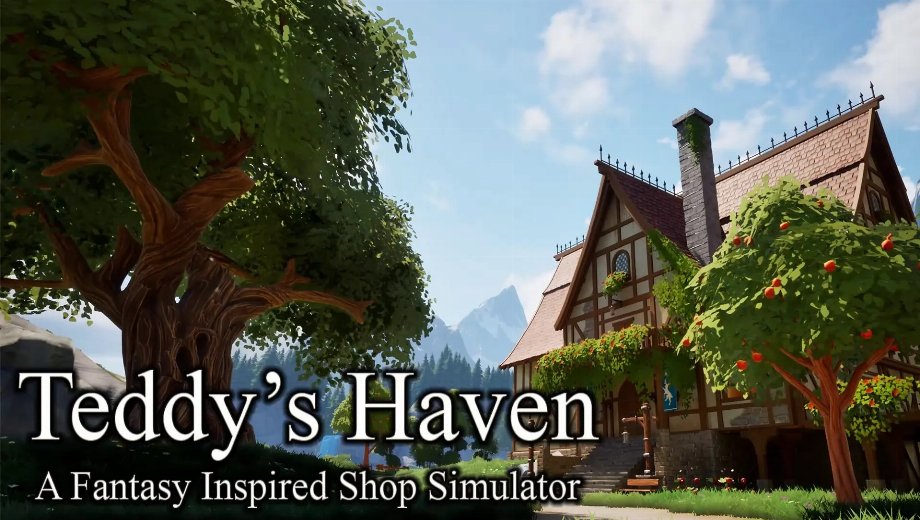
PLITCH Trainer for Teddy’s Haven
Trainer at a Glance
- Total Cheats: 9
- Free Cheats: 4
- Premium Cheats: 4
- Platform: PC (Steam)
- Game Mode: Single-player
- Genre: Simulation, RPG, Adventure
- Developer: Teddy Bear Games
- Publisher: Teddy Bear Games
- Release Year: 2026
Teddy’s Haven puts you in charge of a cozy magical shop on the edge of Ursa, a mysterious island filled with ancient forests and forgotten wonders. You sell potions, weapons, and enchanted curios while leveling up your bear companion Teddy for a growing profit bonus. However, gold builds up slowly through normal sales, and grinding shop experience toward new milestones takes real time.
Because your shop’s success ties directly into how well you manage gold and shop experience, controlling both directly changes how fast Ursa’s secrets unfold around you. The PLITCH trainer for Teddy’s Haven covers all 9 cheat codes for the game.
Free Cheats for Teddy’s Haven
These cheats are free and available to every PLITCH user.
Money/Resources and Player General
- Unlimited Gold: Keeps your gold total permanently full for buying stock and decor.
- Set Gold: Sets your gold total to a specific value.
- Set Jump Height (Default = 600): Adjusts your jump height from its default value of 600.
- Set Crouch Speed (Default = 300): Adjusts your crouching speed from its default value of 300.
PREMIUM Cheats for Teddy’s Haven
PREMIUM unlocks full shop experience and movement speed control.
Skills/Experience
- Add Shop Experience: Adds experience toward leveling up your shop.
- Reset Shop Experience To 0: Resets your shop experience back to zero.
Player General
- Set Walking Speed (Default = 300): Adjusts your walking speed from its default value of 300.
- Set Running Speed (Default = 700): Adjusts your running speed from its default value of 700.
How to Use the PLITCH Trainer for Teddy’s Haven
- Step 1 Click the green “Try It for free!” button on this page to download the PLITCH client securely.
- Create a free or PREMIUM PLITCH account.
- Open the PLITCH client and search for Teddy’s Haven.
- Launch Teddy’s Haven via Steam, then activate your chosen cheats in the PLITCH overlay to control your gold, shop experience, and movement.
Note: PLITCH is designed for single-player use only. Some antivirus or security tools may flag trainers because they interact with game memory, so you may need to add an exception for PLITCH in your security software.

- Secure Software (Virus checked, GDPR-compliant)
- Easy to use: get ready in less than 5 min
- More than 5300+ supported Games
- +1000 Patches every month & Support



![Wild West Supermarket Simulator v1.0.682a (+4 Trainer) [RazorDOX]](https://618b31e8.delivery.rocketcdn.me/wp-content/uploads/2026/10/Wild-West-Supermarket-Simulator-01-464x276.jpg)

![Eastern Era v1.0-v1.1.x+ (+63 Trainer) [FLiNG]](https://618b31e8.delivery.rocketcdn.me/wp-content/uploads/2026/06/Eastern-Era-01-464x276.jpg)






Reasons why PC Gamers love PLITCH
 1000+ monthly Patches
 Make your games harder
 World-class Player Support
 100% People Business
 100% secure software
 Available in 11 languages
Unfortunately, the download is no longer available. Here are some alternatives:
- All downloads for this game: Teddy’s Haven







![Left 4 Dead 2 v2.0.8.8 (+2 Trainer) [whocares]](https://618b31e8.delivery.rocketcdn.me/wp-content/uploads/2024/01/ihatemoutainstopimage-464x276.jpg)
![Nioh 3 v1.0-v2.0+ (+50 Trainer) [FLiNG]](https://618b31e8.delivery.rocketcdn.me/wp-content/uploads/2025/11/Nioh-3-01-464x276.jpg)


