Die Homepage von Steam wird neu gestaltet: Hier ist alles, was sich ändert
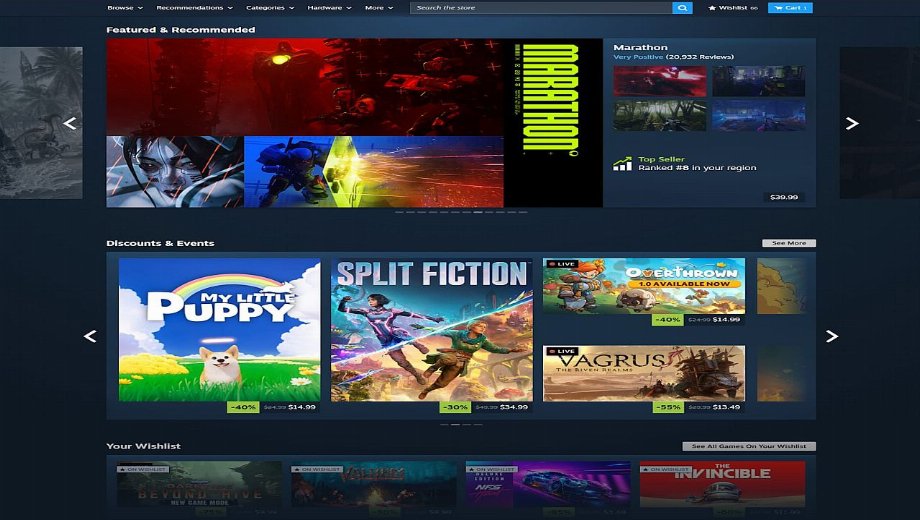
Valve has launched a beta update that redesigns the Steam store homepage for the first time in years. The changes are live right now for anyone willing to opt into the Steam Client Beta, and they cover everything from how games are visually presented to how the discovery and recommendation systems work. No official rollout date has been announced yet.
What Is Actually Changing
Micro-Trailers on Hover
The single most noticeable new feature: hover your mouse cursor over any game artwork on the homepage and a short gameplay trailer starts playing automatically. You get an immediate impression of the game without navigating away from the store front page. If you prefer a cleaner browsing experience, the feature can be turned off in Settings.
Better Recommendations
The “Trending and Recommended” section now explains specifically why a game is being suggested to you, and displays a compact summary of its user review score inline. Previously, recommendations appeared with no context. Now you can make a faster judgment call without clicking through to the full store page.
Discovery List as an Overlay
The discovery list can now be opened as an overlay, letting you scroll through suggestions without losing your current position in the store. Before this change, opening the discovery queue navigated you away from wherever you were browsing.
New Wishlist and DLC Sections
Two new dedicated sections have been added to the homepage. One shows discounted games from your wishlist. The other shows DLC and expansions for titles you already own. Both were previously buried or required manual filtering to find.
Wider Layout and Higher-Resolution Artwork
The store is now slightly wider on desktop, and Valve is using higher-resolution artwork throughout. The Featured carousel at the top now has subtle transparency on the left and right edges. Players on high-resolution screens will notice the improvement, but it is incremental rather than transformative.
Unified Design Language
The interface has been standardized across all sections of the store. Whether you are browsing discounts, new releases, or recommendations, the visual style now feels consistent. Hover tooltips have also been added across various elements, surfacing short descriptions and relevant details without requiring a click.
The Scope of the Redesign
While the visual changes are noticeable, the fundamental structure of the Steam homepage remains the same. The update is a feature refresh rather than a ground-up rebuild. The store still operates as a narrow center strip on wide monitors, so most of the layout changes require close comparison to spot. Fortunately, this evolutionary approach means the redesign translates seamlessly to other platforms. All changes will also appear on Steam Deck and in Big Picture Mode once the update fully rolls out, and beta testers on the Deck can already access the new interface by opting in through their System settings.
How to Try It Right Now
The new interface is available today through the Steam Client Beta. Here is how to opt in on each platform:
On PC
- Open Steam and click Dampf in the top-left corner.
- Gehe zu Einstellungen.
- Select the Interface tab.
- finden. Client Beta Participation and select Steam Beta Update from the dropdown.
- Restart Steam. The new interface will be active immediately.
On Steam Deck
- Drücken Sie die Dampf button and go to Einstellungen.
- Select System.
- Under Beta Participation, switch the channel to Beta.
- Restart the device for changes to take effect.
Since the redesign is still in beta, Valve is actively using community feedback to catch remaining issues before the full rollout. If you run into visual glitches or broken elements, the Steam client has a built-in feedback tool.
Fazit
The Steam homepage redesign is real, but modest. The micro-trailer feature alone is worth the beta opt-in for anyone who browses the store regularly, since being able to preview a game without leaving the front page is genuinely useful. The wider layout and unified design are improvements in principle, though the differences are subtle enough that many users may not notice them without a direct side-by-side comparison. Valve has not announced when the update will leave beta and roll out to all users.




![MechWarrior 5: Mercenaries v1.14.390-v1.15.398 (+18 Trainer) [Void]](https://618b31e8.delivery.rocketcdn.me/wp-content/uploads/2026/08/MechWarrior-5-Mercenaries-01-464x276.jpg)






